
Last month, a friend of mine who owns a bag business called me in frustration. She narrated that she had spent three hours trying to design a professional flyer for her small business using a free version of Canva, and by the time she had finished designing it, not only was she exhausted, but the flyer didn’t even look good at all.
The next day, she called me again and said she paid for Canva Pro and redid the same flyer in 30 minutes, and her exact words to me were, “I should’ve just paid from the start.”
That story sums up the ongoing debate many of us face: should we stick with free plans of AI tools or upgrade to paid plans? In other words, a better question to ask would be, when it comes to paid or free AI tools, which one is actually worth it?
Is the Free Version of AI Tools Good Enough?
Free AI tools are like having access to free samples at a supermarket: you get a taste of the product, make a decision, and then decide whether you actually want to purchase that product or not. The same thing goes for AI tools; they allow you to experiment, learn, and use AI without any financial payment or risk.
Take ChatGPT’s free version (GPT-3.5), It’s conversational, good at generating ideas, and handles basic tasks like email drafts or summaries. If you’re a casual user, you might not even feel the need to upgrade.
Also consider Canva’s free plan; with it you can create basic designs, access a library of templates, and even use some AI features like “Magic Resize” or “Text to Image” (though with restrictions). For a student, freelancer starting out, or someone creating a quick Instagram post, the free Canva version does the job without spending a penny.
Also read: How to Use AI for startups without breaking the Bank.
Pros of the Free Version of AI Tools
- Zero upfront cost: It is perfect for beginners, bootstrapped creators, or those testing the waters with minimal investment.
- Quick accessibility: Most of these free tools don’t require credit cards or long sign-ups.
- Basic functionalities: Many of the free AI tools offer robust core features like text generation, image creation, or simple editing.
- Community support: Popular free tools often have active user communities sharing tips and templates.
Cons of the Free Version of AI Tools
- Usage limits: Monthly caps on characters, API calls, or projects constrain scale and frequency.
- Feature restrictions: Key advanced options like custom voices, multi-language support, or real-time collaboration are often locked behind paywalls.
- Lower priority support: Free users typically get minimal customer service or slower issue resolution.
- Potential quality trade-offs: Free AI tools may be less powerful than paid tiers, thereby impacting output quality.
But free plans often give you just enough to be impressed; once you try to push further, it comes with difficulties. Most times, they respond slower, have limited storage, have locked features, or even have restrictions on the number of queries. This is when the decision about paid or free AI tools becomes less about curiosity and more about necessity.
Also check out this article titled ‘How to Use AI tools without breaking the Bank’.
What Do Paid AI Tools Bring to the Table?
Now, let’s talk about the premium side, where you have to pay to unlock speed, reliability, and advanced features.
For instance, ChatGPT Plus (GPT-4) is noticeably better at complex tasks than the free GPT-3.5 version. It produces more accurate, detailed, and polished content. A 1,000-word essay drafted with GPT-4 usually needs fewer edits than the one obtained from GPT-3.5. For students and professionals, that time saved is priceless.
Imagine you’re writing a professional proposal. GPT-3.5 might give you a decent draft, but GPT-4 gives you a sharper, more nuanced piece of writing with fewer mistakes. If time is money, paying for GPT-4 often saves both.
The same applies to Canva Pro, where the difference is dramatic. You suddenly gain access to millions of stock photos, brand kits, time-saving features like the background removers, and unlimited storage. If you run a small business, those extras make marketing smoother and more consistent.
Pros of the Paid Version of AI Tools
- Advanced and customisable features: from fine-tuned models to workflow automation to priority access to new functionalities.
- Higher usage limits and scalability: Support for large projects, frequent users, or business-critical tasks.
- Better integration capabilities: API access, collaboration features, and enterprise-grade security.
- Dedicated support and training: Faster resolution, onboarding help, and resources tailored for paid users.
- Quality and reliability: Paid tiers get regular updates, ensuring improved accuracy, creativity, and compliance.
Cons of the Paid Version of AI Tools
- Costs add up: subscription fees or usage pricing can get expensive, especially without a clear ROI.
- Overwhelming options: Paid plans are often overwhelming with features.
- Learning Curve: Some paid platforms require more onboarding or technical skill.
Of course, subscriptions cost money, but if you’re not strategic, you could end up spending more than you actually need to. That’s why choosing between paid or free AI tools is less about “better or worse” and more about matching the tool to your goals.
How Do These Paid or Free AI Tools Work?
- Writing Assistance
- Free: The ChatGPT-3.5 or Grammarly Free version is good for writing casual emails, short blog posts and social captions.
- Paid: ChatGPT-4 or Grammarly Premium is necessary for professional proposals, academic work, or long-form content where accuracy matters
- Free: The ChatGPT-3.5 or Grammarly Free version is good for writing casual emails, short blog posts and social captions.
- Design Work
- Free:The free version of Canva is extremely great for simple flyers or personal social media posts.
- Paid: While the paid version is essential if you’re running a brand, need consistent visuals, or want access to premium assets.
- Free:The free version of Canva is extremely great for simple flyers or personal social media posts.
- Video Editing
- Free: CapCut Free version allows you to do basic cuts, transitions, and some AI features like captions.
- Paid: CapCut Pro or tools like Adobe Premiere Pro with AI features is worth the pay if you’re a YouTuber, marketer, or video creator who needs professional polish.
- Free: CapCut Free version allows you to do basic cuts, transitions, and some AI features like captions.
- Productivity
- Free: Notion AI’s limited trial or Microsoft Copilot (basic) is good for notes and light organisation.
- Paid: Full Notion AI or premium Copilot is a game changer for businesses managing large projects, automating workflows, or analysing data.
- Free: Notion AI’s limited trial or Microsoft Copilot (basic) is good for notes and light organisation.
How to Decide Between Using Paid or Free AI Tools
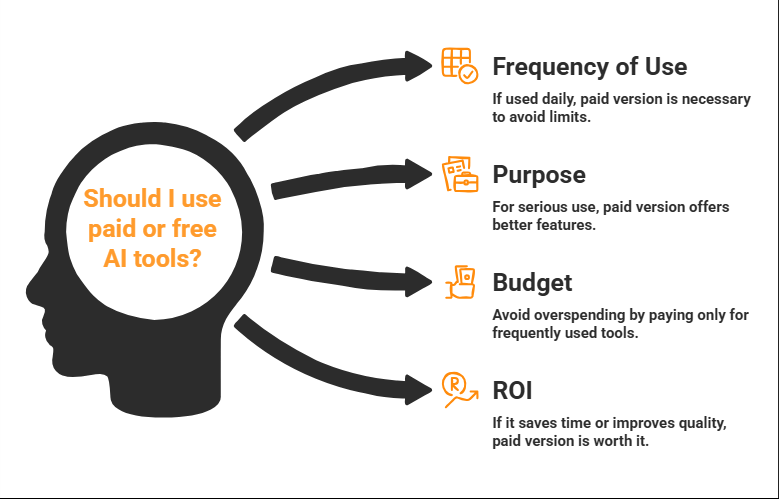
Here’s a practical way to decide whether to start paying for AI tools or stick with the free version:
- Frequency of Use
If you only use an AI tool once or twice a week, then the free plan is probably enough, but if you’re logging in daily, you’ll quickly hit the free plan limits and would need the full paid version for frequent usage. - Purpose
Are you using that particular tool for fun, school, or serious business? A student writing essays may benefit from paying for Grammarly Premium, and a casual blogger may not. If the purpose is higher, then the free version would not be of great help. - Budget
Subscriptions can easily pile up, and so instead of paying for five tools you barely use, it is more economical to pay for only tools that you frequently use, by doing that, you do not end up overspending. - Return on Investment (ROI)
Ask yourself if paying for that particular AI tool helps you earn more, save significant time or even produce better quality work. If your answer is yes, then paying for that tool is worth the investment.
The points listed above make the “paid or free AI tools” debate less confusing , and by doing this, you can make a choice based on need and not just hype.
Who Should Choose Free AI Tools?
- Hobbyists and casual creators experimenting with AI.
- Startups or solopreneurs with tight budgets.
- Early-stage testing and learning phases.
- Projects with low frequency or volume requirements.
Who Benefits Most From Paid AI Tools?
- Businesses needing high-volume or mission-critical AI output.
- Creators who seek full control, advanced customisation, and integrations.
- Teams requiring collaboration, security, and support.
- Entrepreneurs monetising content or automations for profit.
At the end of the day, both free and paid AI tools have their place. Free tools are brilliant for beginners, casual users, or people experimenting, learning, or just doing light personal projects, while the paid tools are essential for anyone who relies on AI professionally, whether for study, business, or content creation.
But if you’re a student, professional, or business owner relying on AI daily, paid tools are almost always worth it. They offer speed, quality, and features that free versions simply can’t match.
Think of it this way: free AI tools open the door, while the paid versions let you walk through, sit down and actually get work done in style. That way you end up enjoying the benefits of AI without overspending.
So, when you’re weighing up paid or free AI tools, ask yourself: am I just experimenting, or do I need real results? Your answer will show you which side of the fence to land on.
If you enjoyed reading this then you will definitely enjoy reading The Shocking Dark Sides of AI Tools: What No one is telling you.