
In 2025, being a creator is a bit of a juggling act, and honestly, the best creators have hacked the game because their secret weapon is ChatGPT extensions.
These little Chrome extensions slip quietly into your browser, but the results they produce are instant captions, effortless research, and content ideas that are top-notch.
This is why the smartest creators are keeping their energy for the spotlight and letting AI do the heavy lifting while everyone else is drowning in tabs and half-written drafts.
Here are the best free ChatGPT extensions that creators can use in 2025 and How to make use of them
1. ChatGPT for Google
This particular extension is like having a research assistant; it puts answers gotten from ChatGPT right next to your Google search results.
Additionally, it is ideal for writers and bloggers because it makes their work more efficient and faster.
Instead of typing “best captions for Instagram Reels” into Google search and going through a dozen blog posts, you’ll see a neat little AI summary sitting right next to your search results.
The good part is that you can also cross-check what humans are saying vs the result pulled out by AI to know which is correct or more accurate.
How to install the ChatGPT for Google Extension:
1. Go to the Chrome Web Store page here
2. Hit Add to Chrome → Add extension.
3. Log in with your OpenAI/ChatGPT account when asked.
How to use the ChatGPT for Google Extension:
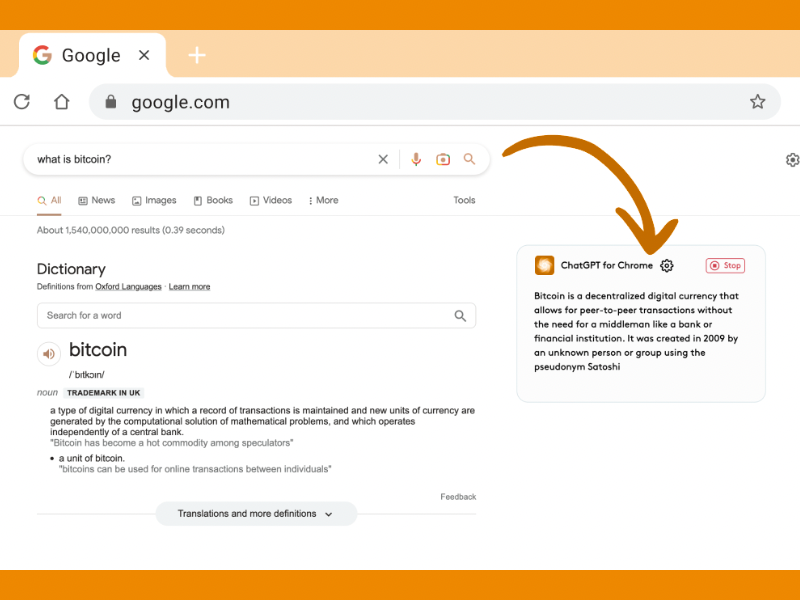
- Type anything into Google search.
- Look to the right side of your search results, and you will notice that ChatGPT’s answer appears.
- Tweak the answer gotten from ChatGPT if needed, or expand your response right there.
2. YouTube Summary with ChatGPT
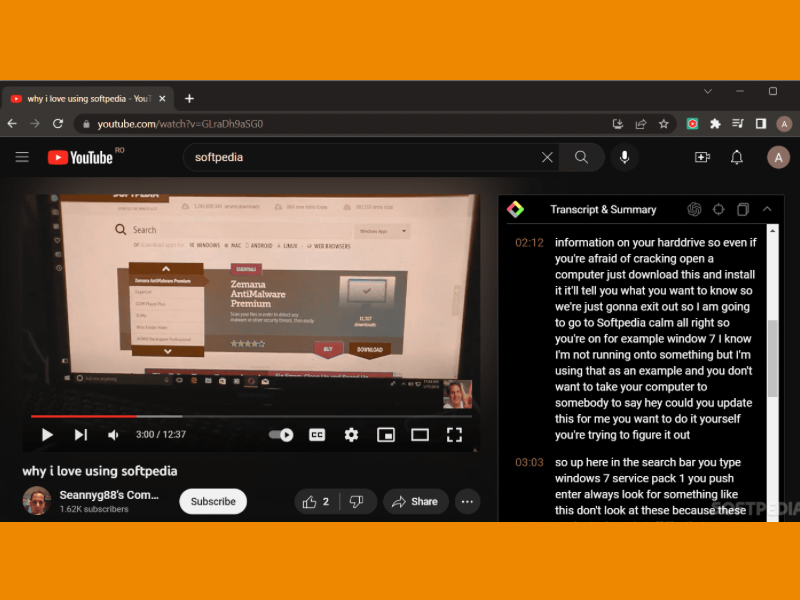
If you are carrying out research that is specific to creating content, then this extension will save you hours. The YouTube Summary with ChatGPT extension turns hour-long videos into neat bullet-point summaries, and now you can just skim through the summary of the video and decide if watching the video is worth your time.
All you have to do is just go to the Chrome Web Store, add the extension to Chrome, and the pricing is free.
Features of the YouTube Summary Extension:
- Summarize YouTube videos and web articles.
- Choose transcript language.
- Time-saving, especially for long videos.
- Pricing is free
How to use the YouTube Summary Extension:
– Open a YouTube video.
– Once you do that, a transcript box will appear on the right.
– Click Summarise with ChatGPT and watch the magic this extension creates.
3. ChatGPT Writer
The ChatGPT Writer is an extension that helps you write and polish emails, long-form texts and DMs.
For those who frequently write emails or need help with messaging, this extension is the best to use.
It integrates with your email and messaging platforms, providing AI-powered writing assistance.
So, whether you’re composing formal business emails or casual conversations, this extension ensures your text is polished and professional.
For example, imagine you drafted an email that sounded wrong with so many corrections and errors. You can highlight it, click the extension, and ChatGPT will rewrite it in a smoother tone.
How to use the ChatGPT Writer:
– Install the ChatGPT writer from Google Chrome Web and add it to your extension.
– Then, open Gmail or any email service you use.
– Highlight text or click reply.
-Right-click → “Generate reply with ChatGPT Writer.”
– Edit if needed and then send.
You can also add instructions, like “make it friendly but professional” or “keep it under 100 words”.
Features:
- Text translation.
- Privacy-friendly.
- High-quality responses for all your writing needs.
Pricing:
- Free with limited features.
- Pro: $14/month.
4. Merlin
MerlinGPT is a versatile ChatGPT extension that works across multiple platforms, including YouTube, Gmail, and even social media.
This plugin can summarize videos and lengthy articles, making it a useful tool for busy professionals. It’s also great for crafting engaging posts for LinkedIn or Instagram.
Features:
- Supports 15 languages.
- Summarizes long-form content quickly.
- Creates email replies and social media posts.
Pricing:
- Starter: $19/month
- Boost: $39/month
- Elite: $119/month
- Free with limited features.
To use the Merlin extension, all you have to do is:
– Install it from Chrome Web browser
– Press `Ctrl+M` (or your custom shortcut), and then a Merlin popup appears.
-Type your prompt and get instant answers without leaving the page.
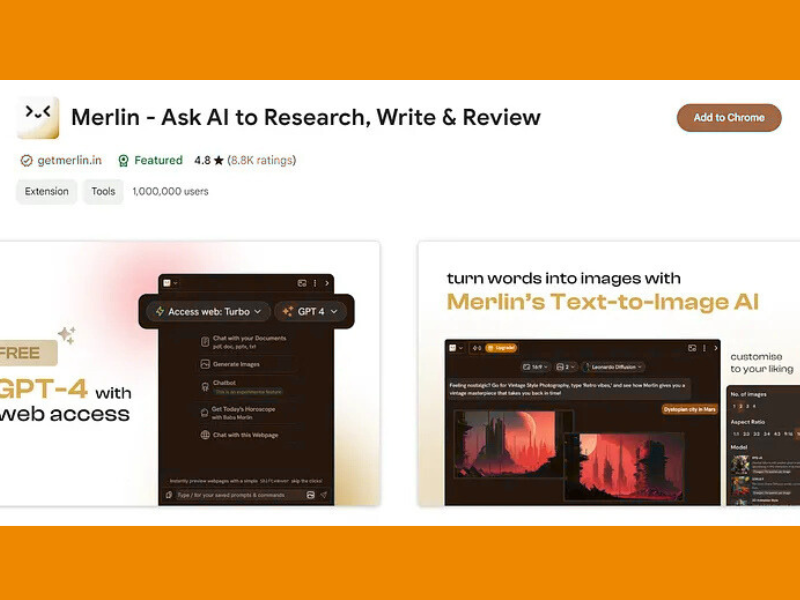
In addition, Merlin is a game-changer when writing in Google Docs because you can brainstorm, outline, and rewrite without copy-pasting.
5. AIPRM (Prompt Manager)
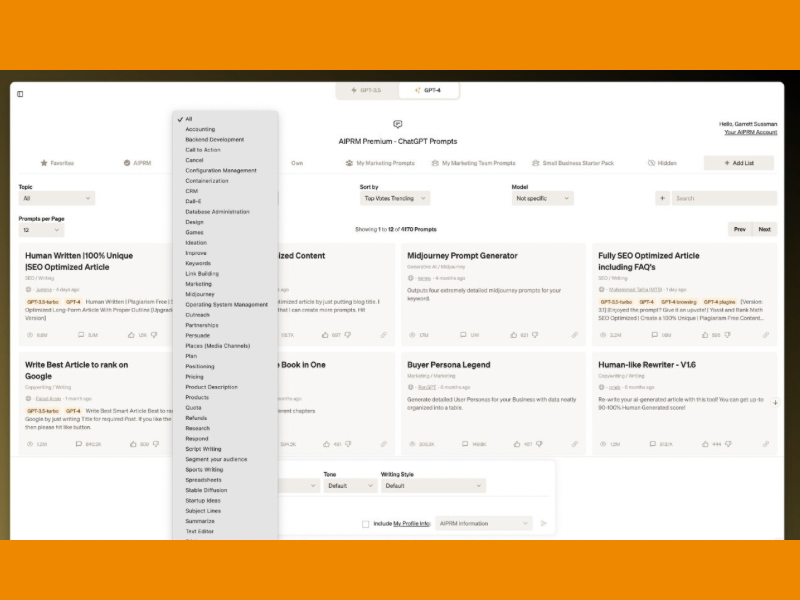
This extension is also called PromptManager because it saves and organises your best prompts.
If you’re the type who always types the same instructions, this extension will save you from retyping them daily.
All you have to do is:
– Download the extension from the Google web browser
– Open ChatGPT in your browser.
– Then you will notice a panel with prompt templates appears.
-Pick one, or save your own.
If you’re serious about mastering prompts with this extension, then check out this eBook titled “Become an AI Prompt Master with AIPRM” .
Quick Guide When Installing Any Extension
If you’re new to extensions, don’t panic because you can literally do this in two minutes.
1. Open the Chrome Web Store page.
2. Click Add to Chrome → Add extension.
3. Approve the permissions.
4. Pin the extension to your toolbar (click the puzzle icon in Chrome → pin), and then you can start using your extension.
Being a creator in 2025 means working smarter and not harder. ChatGPT is powerful on its own, but extensions make it available in areas you need it the most, such as Google, YouTube, Gmail, or any random corner of the web.
So choose two or three extensions, install them, and test them in your everyday workflow. You’ll be surprised how much friction disappears.
Also, remember to keep your extensions light because too many will slow your browser down faster than a shaky Wi-Fi signal.
Also read: Powerful Hidden ChatGPT features That 99% of Users Don’t Know About
